Your Powerwall, on autopilot for hourly prices
Kilobro plans each hour of the day ahead. It charges your Tesla Powerwall when ComEd electricity is cheap and runs your home from the battery when it is expensive. The plan, the prices, and the savings are all on your dashboard, and there are no rules to build.
How it works
Three steps, start to finish
ComEd hourly prices change all day. A battery can buy the cheap hours and skip the expensive ones, but something has to plan it. Kilobro does that planning, every hour.
-
1. Connect your Tesla
-
Sign in with Tesla once, on Tesla's own page, so Kilobro never sees your password. It finds your Powerwall and starts reading prices, solar, and usage. There is nothing to configure.
-
2. Kilobro plans every hour
-
A transparent optimizer weighs ComEd's day-ahead prices against your solar and load forecast, then steers the battery through Tesla's official API. The plan is recomputed as real prices arrive.
-
3. See what it saved you
-
Every action is logged with its reason. The dashboard shows what you saved today, this month, and all time, measured against doing nothing at all.
No black box
See what it is doing and why
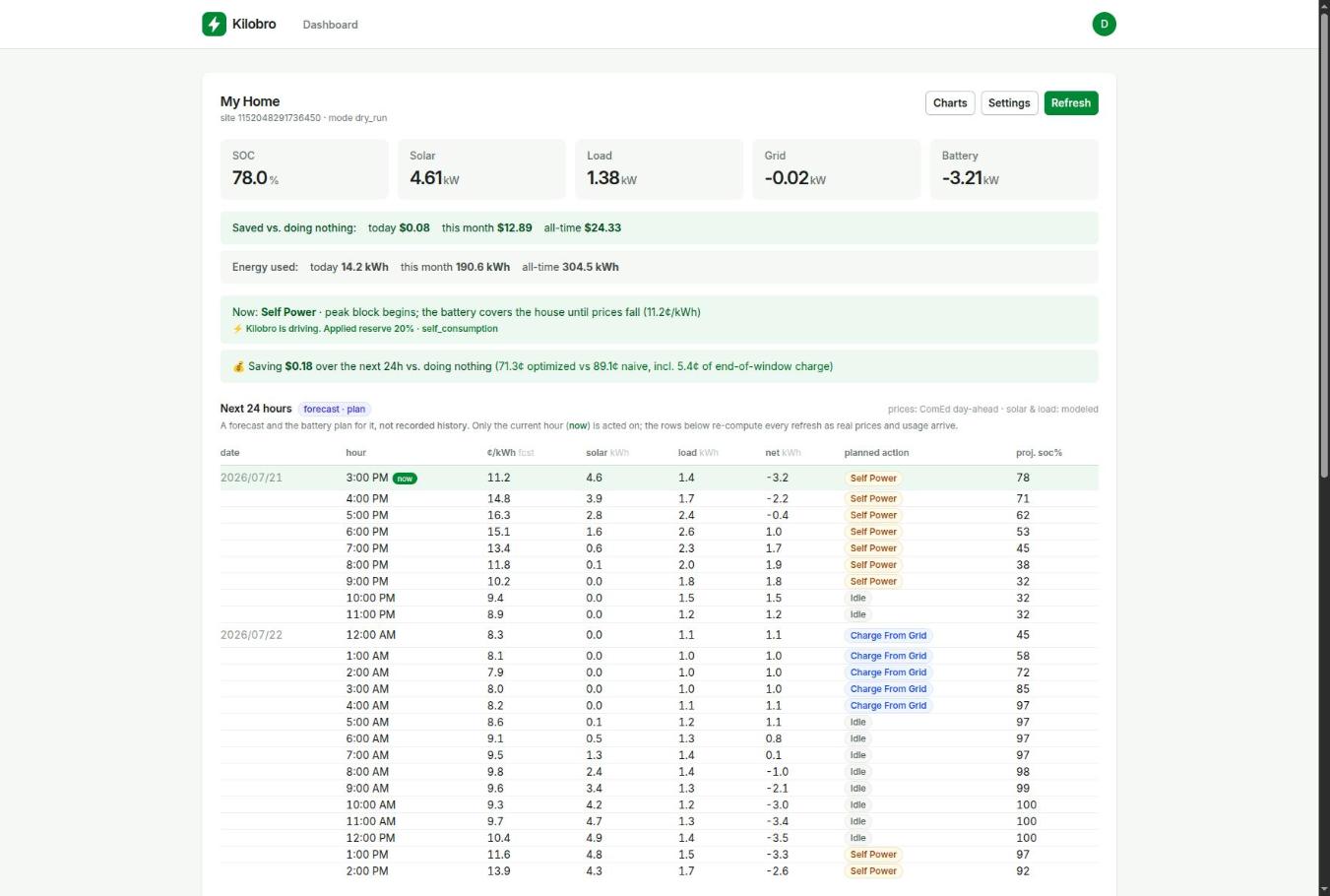
Most battery optimizers hand your prices to a cloud you cannot see into. Kilobro shows the forecast, the plan, every write to the battery, and the math behind the savings number.
- Hour-by-hour plan.
- The next 24 hours of prices, forecasts, and planned actions, recomputed on every refresh.
- Live telemetry.
- Battery state of charge, solar, home load, and grid flow, polled continuously from your site.
- Savings ledger.
- Each hour's cash flow against doing nothing, including the hours spent buying cheap power.
- Honest benchmarking.
- The optimizer is backtested against a perfect-foresight oracle on real ComEd data. We publish the gap, not just the wins.
- Zero configuration.
- There are no trigger rules or thresholds to build and babysit. Connect once and the plan adapts on its own.
- Official Tesla Fleet API.
- Backup reserve and mode adjustments only, the same controls the Tesla app exposes. Tokens are stored encrypted.
Built for hourly markets
Replanned all day, every day
Prices change every hour and so does the plan. Kilobro runs receding-horizon optimization, the same shape of planner grid-scale storage uses, on your one battery.
- planning horizon
- 24 hours
- plan recomputed
- Every hour
- telemetry cadence
- 15 min
- price at launch
- $5/mo
Pricing
Free during beta. $5 a month at launch.
One plan with everything in it. Cancel whenever you want.
Everything included
There are no tiers and no feature gates. Every account gets the full optimizer and all of its data.
What you get
- Powerwall autopilot on ComEd hourly pricing
- Hour-by-hour plan and live dashboard
- Savings ledger, history, and charts
- Solar and load forecasting
- Monitoring-only mode for battery-less sites
- Email support from the person who built it
While in beta
$0 /month
Start free$5 a month when billing launches. You will get notice first, and you can cancel anytime.
Frequently asked questions
- Which utilities does Kilobro support?
ComEd hourly pricing (northern Illinois) today. That is where we run our own hardware. More dynamic-pricing markets are on the roadmap.
- Do I need solar?
No. Kilobro arbitrages grid prices with any Powerwall, and solar just makes the plan richer. Sites without a battery can run in monitoring-only mode.
- How does Kilobro control my Powerwall?
Through Tesla's official Fleet API, by adjusting the backup reserve and operation mode. These are the same controls the Tesla app exposes. There are no firmware hacks, and every write is logged in your control log.
- Is my Tesla login safe?
You sign in on Tesla's own page using OAuth. Kilobro never sees your password, stores its tokens encrypted, and you can revoke access from your Tesla account at any time.
- Will this hurt my battery?
Kilobro respects the SOC floor and reserve cap you set, and Tesla's firmware remains the final authority on every command. Kilobro cannot push the hardware anywhere Tesla's own controls would not.
- How much will I save?
It depends on your usage and ComEd's price spreads, so we do not quote an average. The dashboard measures your actual savings against doing nothing, hour by hour.
- What happens when the beta ends?
You will get notice before billing starts at $5 a month. You can export or delete your data and disconnect your Tesla at any time.
Look at the first day's plan
Connect your Tesla, see what Kilobro would do with your battery tomorrow, and decide from there.